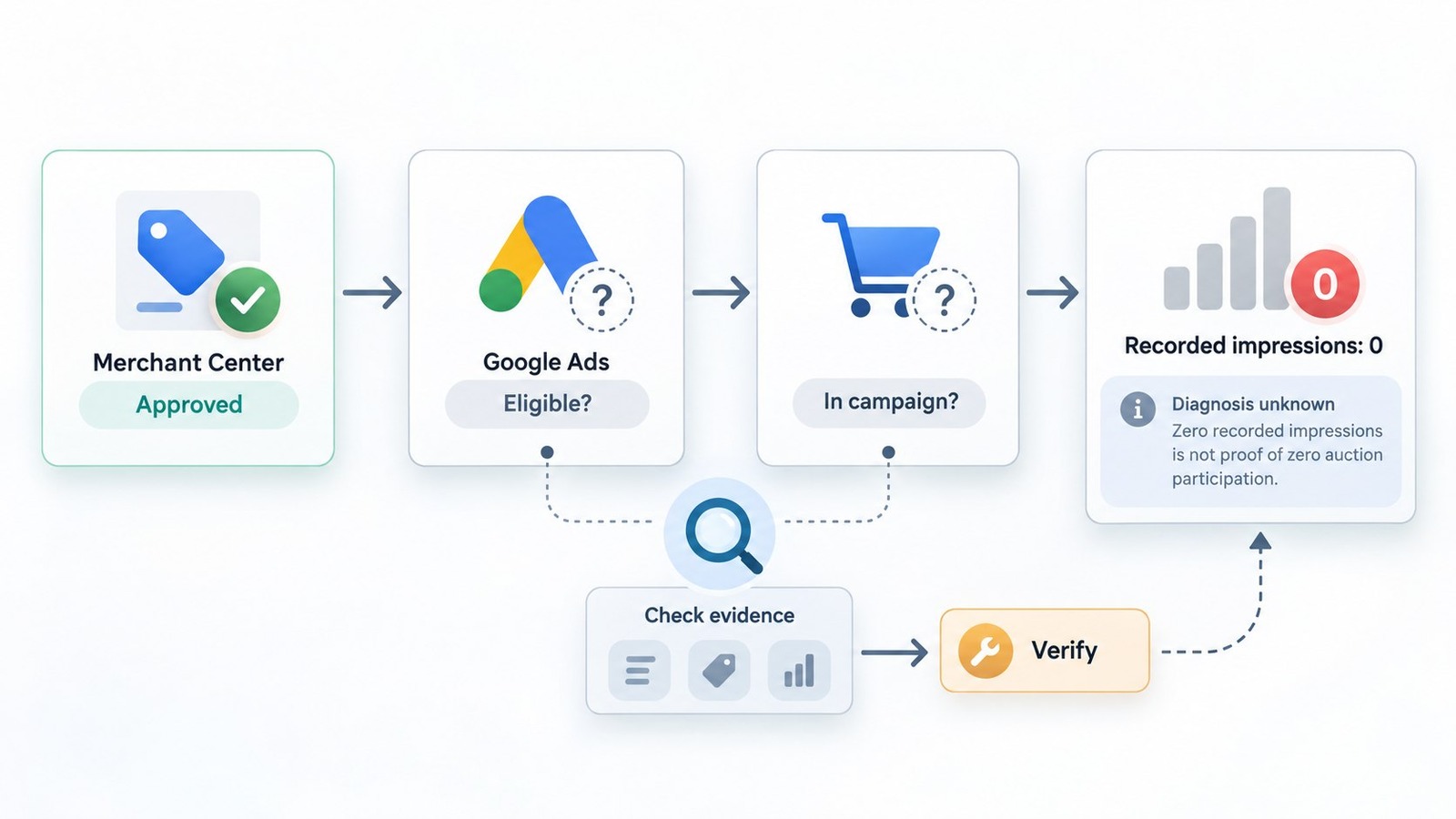
Your products are approved in Google Merchant Center. Your Google Ads campaigns are active. Some products in the same store receive impressions normally. Yet other approved products receive zero or extremely limited impressions in Google Shopping ads, even when they appear relevant to commercially valuable searches.
This is fundamentally different from a product disapproval. Merchant Center approval establishes neither that a product is included in an advertising campaign nor that it will receive Shopping auction exposure.
For a UK Shopify merchant using a Google Sheets product feed, Standard Shopping and Performance Max, the investigation must follow each affected product through its processed Merchant Center identity, advertising eligibility, campaign inventory inclusion, bidding conditions and actual reporting scope.
The critical distinction: Merchant Center approval, Google Ads product eligibility, campaign inclusion, auction participation and recorded Shopping impressions are different states. Evidence for one does not automatically establish another.
Google's Product diagnostics documentation explains how product eligibility can be examined at the account, campaign and product or listing-group levels. An eligible product is not guaranteed impressions, and zero reported impressions do not independently prove that the product was excluded from every auction.
In the underlying merchant scenario, the account owner has already tried creating new product IDs and SKUs, recreating Merchant Center products, separating products into campaigns, testing Standard Shopping and Performance Max, reviewing diagnostics and exclusions, inspecting search terms, modifying feed data, changing campaign structures and investigating Comparison Shopping Services (CSS) options.
Those previous attempts matter. Repeating them without establishing which serving condition is responsible could introduce more variables while providing little additional diagnostic evidence. The actual root cause remains unknown.
A credible investigation therefore begins with read-only evidence collection. Build comparable cohorts of affected and normally serving products, preserve their effective product identities, record their advertising eligibility and campaign relationships, and establish a consistent reporting baseline before making further changes.
Product comparisons should account for differences in product age, target market, attributes, campaign configuration and observation period. Newly introduced products should not automatically be compared against months of accumulated history for established products.
The investigation must also distinguish Shopping advertising impressions from broader Performance Max metrics. Performance Max may report product impressions across multiple advertising networks. An increase in aggregated Performance Max impressions is not, by itself, proof that an affected product has resumed receiving Google Shopping auction exposure.
This guide explains how to separate eligibility restrictions from auction competitiveness, investigate product identity and campaign relationships, and verify targeted changes using evidence appropriate to the specific Shopping serving problem.
Merchant Center Approval Is Not the Same as Shopping Auction Eligibility
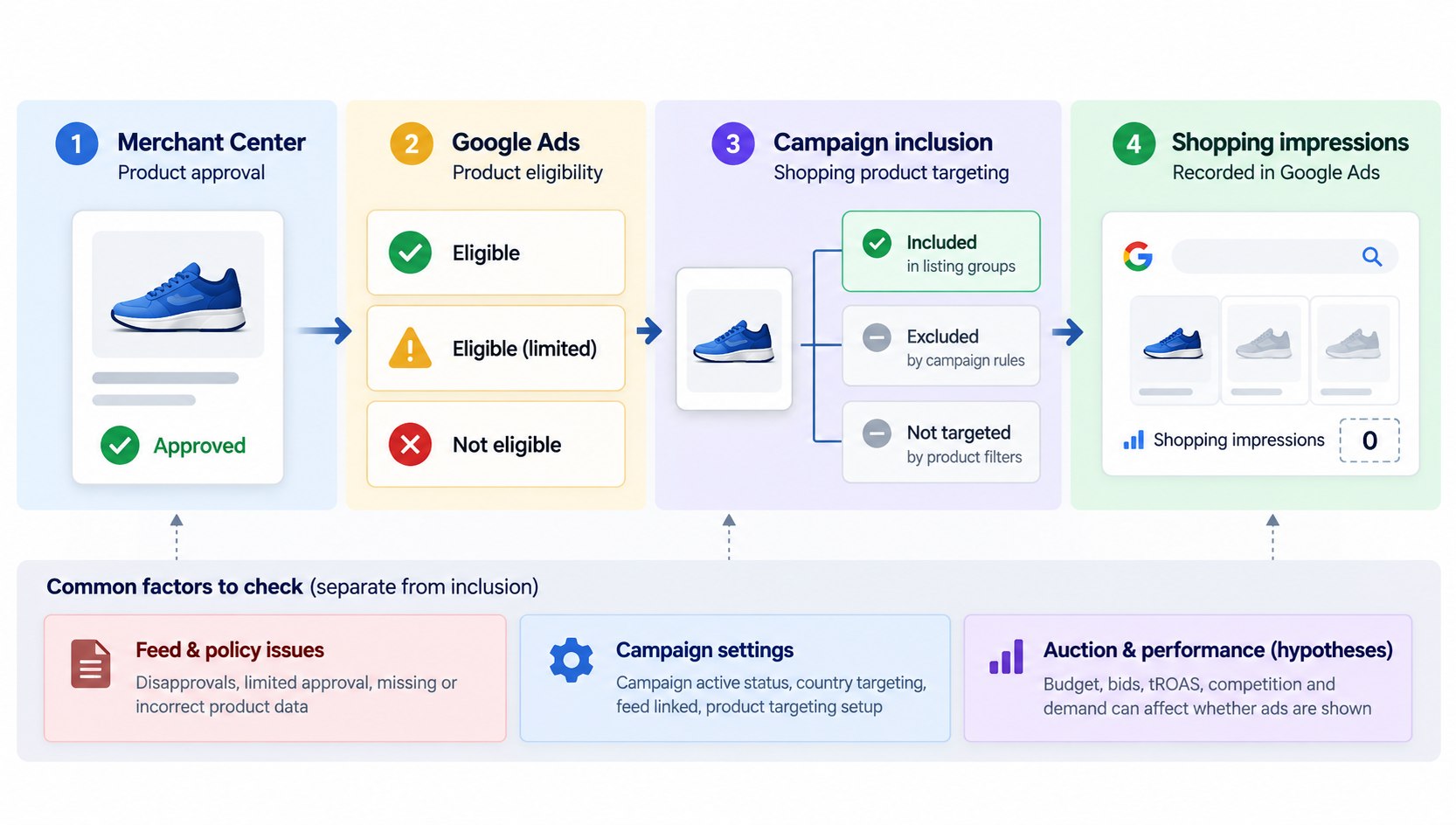
Google Shopping involves several distinct stages. Confusing them is one reason zero-impression problems can remain unresolved after multiple campaign changes.
A simplified diagnostic sequence is:
- Merchant Center approval: Google has accepted the product for the relevant destination, subject to its current status and applicable restrictions.
- Google Ads product eligibility: Google Ads determines whether the product can be advertised under the applicable account and campaign conditions.
- Campaign inclusion: An eligible campaign must actually include the product through its inventory filters, product groups or listing groups.
- Auction opportunity: The campaign must have an opportunity to compete for a relevant ad placement.
- Auction outcome: The ad must win an impression for the product to appear.
- Reporting: Google Ads records the resulting product-level exposure using its reporting definitions.
These stages should not be treated as interchangeable.
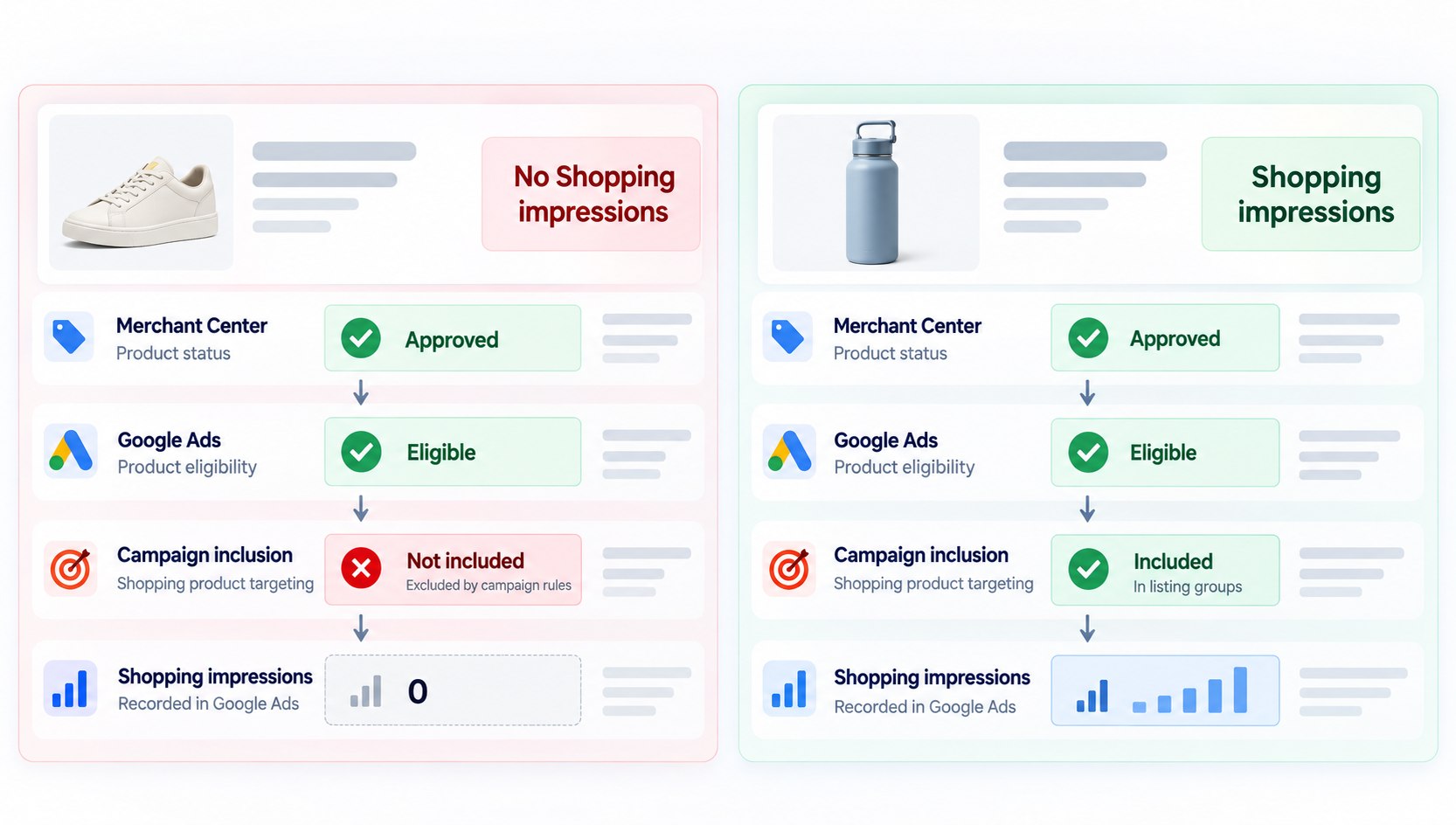
A product marked approved in Merchant Center may still be excluded from every advertising campaign. A product marked Eligible in Google Ads may compete unsuccessfully or receive few opportunities to appear. A product receiving zero reported impressions has not necessarily been proven absent from every auction.
Google Ads distinguishes three particularly useful product diagnostic states:
- Eligible: The product is ready to show in advertisements, although impressions are not guaranteed.
- Eligible (limited): The product can advertise but may face limitations associated with product attributes, settings or other restrictions.
- Not eligible: A specific issue prevents the product from serving at the relevant reporting level.
It is also important to distinguish Shopping ad eligibility from eligibility for free product listings. Approval for one marketing method should not be assumed to establish eligibility for another.
The first question is therefore not why Google rejected the product. It is where the product stops progressing toward measurable advertising exposure.
Start With Affected and Normally Serving Product IDs
Before editing anything, select a small comparison group containing both affected products and products that serve normally.
This is especially useful when an issue affects only part of a catalog. Products that receive impressions provide a practical reference for how the account currently behaves.
For each affected product, record:
- Merchant Center account and product ID.
- Submitted and processed product attributes.
- Country, language, feed label and marketing destination.
- Current approval status and associated notices.
- Primary data source and most recent successful update.
- Availability, price, product URL and inventory status.
- Google Ads product eligibility and issue details.
- Campaigns and product or listing groups that include the item.
- Product-level impressions, clicks and cost over a consistent date range.
Collect the same information for comparable products that receive impressions.
For example, a golf retailer could compare two similar headcovers advertised in the same country. If one receives impressions and the other receives none, the investigation can focus on differences in product identity, campaign inclusion, feed processing and product attributes.
However, do not infer a cause from that difference alone. The products may face different levels of competition or demand.
Make sure that product IDs are matched consistently across reports. A Shopify variant identifier, internal SKU and Merchant Center product ID are not automatically interchangeable.
The reporting period matters too. Products introduced yesterday should not be compared uncritically with products that have been active for several months.
Google also expanded its product reporting beginning in June 2026. Performance Max product metrics can now incorporate additional networks, which may produce differences from older reports. Compare like-for-like dates, networks and metrics when evaluating historical exposure.
The output of this step should be an evidence sheet, not a conclusion.
Check Google Ads Product Diagnostics Before Changing Campaigns
Google Ads Product diagnostics is one of the most direct places to investigate whether a Merchant Center product is actually ready to advertise.
In Google Ads, navigate to Campaigns → Products → Diagnostics. Inspect the account-level product view, then filter to the relevant campaign where appropriate. The interface may vary slightly by account.
Check the product status and Issues column for each affected item.
Start with these questions:
- Does the affected product appear at the account level?
- Is its status Eligible, Eligible (limited) or Not eligible?
- Does the status change when viewed within a specific campaign?
- Does Google identify a product issue or a reason why no campaigns are advertising the item?
- Is the product excluded by a product group, listing group or inventory filter?
Google explicitly identifies situations where no campaign includes a product, a campaign or asset group is paused, or a product has been excluded by campaign inventory settings.
These can explain why an item approved in Merchant Center is not being advertised.
But diagnostics should still be interpreted carefully. For example, an Eligible product with zero impressions requires a different investigation from an item classified as Not eligible because no campaign includes it.
If the product is Not eligible, collect the precise diagnostic reason before making a correction. If it is Eligible, preserve that finding and move toward bidding, competition, reporting and serving analysis.
Do not rebuild the campaign merely because the Diagnostics page does not immediately explain low traffic. A missing error message is not proof that every downstream serving condition is healthy.
Trace Each Product Through Standard Shopping and Performance Max
An active campaign does not establish that every approved product is included in its advertising inventory.
The next step is to follow the affected product through the account's actual campaign configuration.
Standard Shopping checks
Inspect the linked Merchant Center account, selected country, inventory filters, ad groups and product groups.
Confirm that the product belongs to an included product group and that the relevant group has a usable bidding configuration. Look for exclusions at parent and child levels.
If the same product appears in multiple Standard Shopping campaigns, inspect campaign priorities and their related inventory settings. Google's campaign priority documentation explains how priority affects which Standard Shopping campaign supplies a bid when campaigns advertise overlapping products.
Campaign priority should not be treated as a universal rule governing all campaign types.
Performance Max checks
Begin with read-only inspection of the Merchant Center association, asset groups, listing groups, inventory filters, campaign status, targeting settings and relevant bidding configuration.
For each affected product, establish its effective Merchant Center identity, including the item ID and applicable country, language and feed label. Confirm that the exact product is present in the relevant Performance Max listing-group inventory and is not excluded by a parent group, subdivision, inventory filter or other applicable setting.
A category-level assumption is insufficient. A campaign may include golf accessories generally while excluding a particular headcover or product subdivision. Record the actual listing-group path and exclusion state rather than inferring inclusion from the product category.
Compare affected products with a cohort of normally serving products under comparable account, campaign, geography and reporting conditions. Capture the configuration before making any changes. The merchant has already tested Performance Max and separate campaign structures, so another campaign rebuild is not a substitute for identifying a specific discrepancy.
If Performance Max and Standard Shopping target overlapping products, do not assume that Performance Max always takes precedence or that Standard Shopping must be disabled.
Google's current Shopping onboarding guidance states that when Standard Shopping and Performance Max target the same products under overlapping targeting conditions, Ad Rank determines which campaign serves.
Inspect the actual product inclusion, targeting overlap and campaign configuration. Standard Shopping campaign priority settings should not be generalized into rules governing competition between Standard Shopping and Performance Max.
Reporting scope is especially important for Performance Max. The campaign can serve advertisements across multiple Google advertising networks. Product-level impressions aggregated across those networks must not be interpreted as Shopping-only impressions.
Where supported by the available Google Ads reporting interface, examine channel-level and campaign-level performance alongside product-level reporting. Record the reporting dimensions, filters, network scope, date range and product identity used for each observation.
Do not assume that combining a product-level report with a separate campaign-level or channel-level report proves that the same product received a Shopping impression. If the available reports do not provide that attribution, preserve the limitation explicitly.
A useful investigation should distinguish three questions:
- Inventory inclusion: Is this exact product included in an active Performance Max configuration that can advertise it?
- Eligibility and serving conditions: Are there documented restrictions, bidding constraints, conversion-data limitations or other conditions that may affect exposure?
- Observed exposure: What impressions can actually be attributed to the product, campaign and relevant advertising network using the available reporting dimensions?
These questions produce different forms of evidence. Product inclusion does not demonstrate auction participation, and aggregated cross-network impressions do not establish Shopping-specific serving.
The goal is to determine which active campaign configurations can advertise the affected product, what exposure the available reports actually demonstrate, and what remains unverified. Any proposed correction should follow that evidence rather than outdated campaign-priority assumptions or another unsupported restructuring attempt.
Audit Google Sheets Feeds, Product IDs and Supplemental Sources
Google Sheets is a supported way to provide product information to Merchant Center. Its presence does not, by itself, indicate a feed problem.
However, feed structure and effective product identity deserve close attention when individual products behave differently.
Start by identifying every product data source actually connected to Merchant Center. Do not assume that Shopify is also submitting an active feed simply because the store uses Shopify.
Then compare the spreadsheet with the product data Merchant Center has actually processed.
Useful checks include:
- Whether the latest spreadsheet update was processed successfully.
- Whether affected rows contain valid, stable product IDs.
- Whether the product's target country, language and feed label are consistent.
- Whether supplemental sources exist and match the intended primary products.
- Whether feed rules or source precedence alter important attributes.
- Whether products have been removed, recreated or assigned new identifiers.
- Whether the resulting Merchant Center product identity matches the item selected in Google Ads.
Google's data source documentation explains that supplemental data sources use product identifiers to match information with products from primary sources. Matching configuration matters when supplemental data is present.
Product IDs should remain stable for the same product. Google's ID specification recommends using a stable identifier and explains the importance of consistent product identity.
Repeatedly creating new product IDs may complicate analysis by changing the product identity being tracked. It is not a reliable substitute for diagnosing an existing serving problem.
A practical way to investigate is to construct a three-way comparison: the original Google Sheets row, the processed Merchant Center product, and the product record visible in Google Ads.
Document any discrepancy before treating it as causal.
If the values match and there are no relevant processing issues, the investigation should move forward rather than continuing to recreate feed entries without supporting evidence.
Investigate Bidding, Conversion Data and Auction Competition
Once a product is confirmed eligible and included in a campaign, the investigation changes.
At this stage, low impressions may reflect auction competitiveness, automated bidding behavior, demand, or other serving conditions rather than a product configuration defect.
Review the campaign's actual bidding strategy, status and available diagnostics. For value-based strategies, examine the target ROAS setting, recent target changes, conversion volume and conversion delay.
Check whether purchase conversion actions are recording correctly and whether the account's optimization goals reflect the intended business objective.
A restrictive target may reduce the opportunities a campaign can pursue, but it should not be declared the cause without evidence. Similarly, raising a budget cannot fix a product excluded from every campaign.
Google's low-traffic troubleshooting guidance identifies bidding constraints and auction dynamics among possible reasons campaigns or products receive limited exposure.
For Standard Shopping, review available search impression-share metrics, benchmarking information and bid simulators where sufficient data exists. Some diagnostic reports will be unavailable or unreliable for very low-volume products.
For Performance Max, review product-level reporting, available channel-level data and campaign diagnostics. Avoid interpreting total Performance Max impressions as exclusively Google Shopping Search impressions.
Strong engagement from a handful of impressions can indicate that the observed audience finds a product relevant. It does not establish the size of the addressable auction market or prove that the product should receive substantially more impressions.
If a product has genuine auction opportunities but is not competitive, a carefully controlled bidding test may eventually be justified. That decision should follow the evidence rather than precede it.
Review Product Attributes, Landing Pages and UK CSS Configuration
Products can be eligible yet less competitive because their attributes do not adequately communicate what they are.
Compare the affected products with normally serving products for title specificity, product type, brand, identifiers, availability, imagery and landing-page quality.
For a golf headcover, useful title information may include the intended club type, material, design and brand when these characteristics accurately describe the product.
Do not add attributes or identifiers that are not true. Google's unique product identifier guidance explains when GTIN, brand and MPN information should be provided, including cases where a product does not have an assigned GTIN.
Also compare the final product landing page with the effective Merchant Center data. Verify that the product loads correctly, is purchasable, displays consistent pricing and availability, and can be accessed by Google's systems.
Google's landing-page requirements provide the relevant technical and policy expectations. A landing-page issue is a hypothesis to test, not a finding to assume when the product is reported approved.
UK Comparison Shopping Services
The UK operates within Google's Comparison Shopping Services framework.
According to Google's CSS documentation, merchants can participate through Google Shopping or other eligible CSS providers, and may use more than one service.
Confirm which CSS arrangements are active, which Merchant Center accounts they use, and whether the relevant CSS is authorized to promote the products.
A CSS configuration should not be blamed merely because the merchant has investigated CSS options. First establish the current arrangement and identify a discrepancy connected to the affected products.
Build a Root-Cause Evidence Matrix Before Making Changes
A useful audit connects every possible cause to a specific observation and a test capable of confirming or challenging it.
Consider the following diagnostic framework. The entries are illustrative possibilities, not findings from a particular merchant account.
| Possible issue | Evidence to collect | Appropriate next step |
|---|---|---|
| Product excluded from campaigns | Google Ads product status and listing-group path | Correct the specific exclusion if confirmed |
| Product identity mismatch | Merchant Center processed ID and Google Ads item record | Reconcile identifiers and source mappings |
| Supplemental source conflict | Active data sources and effective attributes | Correct a documented override or matching error |
| Restrictive bidding behavior | Bid-strategy status, targets and conversion diagnostics | Design a controlled bidding test if justified |
| Weak product relevance | Product attributes and serving-product comparisons | Improve verified product information |
| UK CSS configuration issue | Active CSS permissions and associated accounts | Correct a verified account or authorization problem |
| Reporting mismatch | Date ranges, product IDs and campaign/network scope | Reconcile reporting before diagnosing non-serving |
For each suspected cause, record the affected products, exact evidence, proposed explanation, confidence level and any alternative explanation.
Separate confirmed configuration facts, reasonable but unconfirmed hypotheses, and changes that have actually been validated.
This prevents a common diagnostic mistake: finding a difference between two products and immediately treating that difference as the root cause.
If several possible causes remain, prioritize tests that are reversible, narrowly scoped and measurable. Avoid changing identifiers, campaign structures, bids and product attributes simultaneously. Multiple concurrent changes make it difficult to determine which intervention mattered.
A technically credible diagnosis should explain not only what appears wrong, but also how the available evidence supports the proposed causal relationship.
Verify Whether a Targeted Fix Restores Product Serving
Identifying a plausible configuration problem is not equivalent to demonstrating that it caused the observed lack of Shopping impressions. Likewise, correcting a configuration issue is not sufficient evidence that a product has resumed receiving Shopping advertising exposure.
A reliable verification process must distinguish configuration correction, product eligibility, observable advertising delivery and evidence of Shopping-specific serving.
Establish a read-only baseline
Before implementing any change, capture a baseline for a defined cohort of affected product IDs and, where practical, a comparable cohort of normally serving products.
For each product, record:
- Product identity: Merchant Center account, item ID, applicable country, language, feed label and relevant source relationships.
- Merchant Center state: Approval for the intended advertising destination, product-level notices, processed attributes and last successful data-source update.
- Google Ads eligibility: Account-level and campaign-level product status, diagnostic issues and documented limitations.
- Campaign inclusion: Relevant Standard Shopping product groups, Performance Max listing groups, inventory filters and exclusions.
- Reporting scope: Campaign ID, campaign type, available network or channel dimensions, date range, time zone and product-level impressions, clicks and cost.
- Change history: Recent modifications to product IDs, feeds, campaign structures, bidding targets, conversion settings and CSS arrangements.
Use like-for-like reporting wherever possible. Comparisons must preserve consistent product identities, metric definitions, campaign and network scope, date ranges and attribution conventions.
A newly introduced product with a short observation history should not be assessed against the cumulative lifetime impressions of an established product. Similarly, Standard Shopping product impressions should not be directly equated with aggregated Performance Max product impressions without accounting for their reporting differences.
Preserve screenshots or exported reports with collection timestamps where appropriate. Evidence should remain traceable to the exact product and configuration that existed at the time.
The merchant has already tested new identifiers, feed modifications, Performance Max, Standard Shopping and different campaign structures. Retain this history as diagnostic evidence rather than repeating those experiments without a new, testable explanation.
Apply one evidence-supported correction
After identifying a specific issue, document the proposed causal explanation, supporting evidence, alternative explanations, expected observable change and rollback procedure.
Implement the smallest justified correction with appropriate authorization. Examples include removing a confirmed inventory exclusion, correcting a demonstrated data-source mismatch or resolving an explicitly documented eligibility limitation.
Avoid simultaneously changing product identifiers, campaign structure, bidding targets and product attributes. Concurrent interventions make attribution difficult and may introduce additional serving or reporting changes.
Allow sufficient time for product processing, policy review, campaign updates and automated bidding behavior where relevant. Google's Shopping troubleshooting documentation explains that newly created or edited products, data sources and campaigns may require review time and that performance can take additional time to stabilize.
The observation window should reflect the type of change, reporting latency, product history and available traffic. Do not assume that one fixed waiting period is sufficient for every diagnosis.
Separate Shopping evidence from Performance Max cross-network impressions
After the change, evaluate the same affected product cohort using comparable reporting definitions and observation windows.
For Standard Shopping, use product-level reporting attributable to the relevant Standard Shopping campaign, confirming the product identity, reporting period and applicable campaign configuration.
For Performance Max, examine the most granular reliable product, campaign and channel information available. Performance Max product impressions may include advertising exposure beyond Shopping placements. A product-level increase in aggregate Performance Max impressions must not be presented as proof of renewed Shopping auction participation.
Where the available channel reporting cannot attribute Shopping-specific impressions to an individual product, state that limitation. Do not infer product-level Shopping exposure merely by combining separate aggregate channel and product reports.
Even when Shopping-specific impressions are observed, the data demonstrates recorded advertising delivery, not every internal auction decision. Standard Google Ads reporting may not establish whether an individual product entered every potentially relevant auction or why it lost particular opportunities.
Do not declare Shopping serving restored solely because Merchant Center approval remains valid, Google Ads reports the product as Eligible, or aggregate Performance Max impressions increase.
Apply explicit verification outcomes
Use the following evidence states to avoid treating intermediate improvements as completed repairs:
| Verification state | Minimum supporting evidence | Permitted conclusion |
|---|---|---|
| CONFIGURATION_CORRECTED | A documented configuration issue was changed and the new state was verified | The identified configuration issue was corrected; advertising delivery is not yet established |
| ELIGIBILITY_CONFIRMED | Current diagnostics and campaign inventory checks support the intended product's eligibility and inclusion | The product is eligible under the observed conditions; impressions are not guaranteed |
| IMPRESSIONS_OBSERVED | Product-level advertising impressions appear in a clearly identified reporting scope | Advertising delivery was observed in that scope; the result may include non-Shopping networks |
| SHOPPING_SERVING_SUPPORTED_BY_EVIDENCE | Reliable reporting attributes Shopping advertising impressions to the affected product and relevant campaign or inventory | Shopping advertising delivery is supported for the observed period; individual auction participation beyond observed delivery is not fully disclosed |
| UNRESOLVED | The intended exposure is still absent, insufficiently observed or not distinguishable from broader reporting | The Shopping serving problem has not been verified as resolved |
These states describe different dimensions of progress and must not be collapsed into a single success flag. An observed impression does not, by itself, identify the root cause of the earlier serving restriction.
Compare outcomes and evaluate causality
After the observation window, answer five questions:
- Did the identified configuration or diagnostic issue disappear?
- Does the exact product remain approved and eligible for the intended advertising destination and campaign?
- Did comparable unaffected products or relevant market conditions change during the same period?
- Are post-change impressions genuinely comparable with the baseline in terms of product identity, campaign, network and reporting definitions?
- Does the evidence establish Shopping-specific delivery, only broader advertising exposure, or no meaningful exposure change?
Removing a confirmed exclusion and observing subsequent Standard Shopping impressions provides stronger support for successful serving restoration than merely observing that a product became eligible. However, temporal association alone does not conclusively establish that the intervention was the sole cause.
Record the confidence level, competing explanations and remaining limitations. If only cross-network Performance Max impressions are available, classify Shopping-specific serving as unverified rather than claiming the original problem has been fixed.
If the affected products remain eligible but continue receiving zero or near-zero relevant Shopping impressions, keep the case unresolved. Reassess bidding constraints, conversion signals, account-level conditions, competitiveness, demand, reporting limitations and other supported hypotheses.
The final audit should explain what was demonstrated, what changed, what remains uncertain and what additional evidence would be required. The objective is a verifiable diagnosis and, where possible, a validated correction—not a declaration of success based on incomplete metrics.
Prevent Approved Products From Quietly Losing Shopping Exposure
A strong Shopping operation monitors more than product approval counts.
An item can remain approved in Merchant Center while losing campaign inclusion, becoming limited by configuration, or receiving little advertising exposure.
Create a repeatable product-level monitoring process that compares three signals: Merchant Center destination status, Google Ads eligibility, and actual product impressions.
For newly introduced products, verify their effective feed attributes and campaign inclusion before evaluating traffic. For established products, flag meaningful changes in visibility against an appropriate baseline.
Maintain stable product identifiers and document source ownership so that feed updates can be traced to the responsible process. When an integration or spreadsheet changes, validate the processed output instead of assuming successful submission means every attribute was applied as intended.
An effective exception workflow should specify:
- Which product IDs are affected.
- When the last healthy serving observation occurred.
- Whether the product is approved, limited or ineligible at each relevant level.
- Which campaign and data source own the item.
- Which diagnostic evidence has been captured.
- Who is responsible for investigating and approving changes.
- How the proposed correction and its outcome will be verified.
This approach turns intermittent zero-impression complaints into a structured investigation rather than an endless sequence of campaign experiments.
Final Takeaway: Diagnose Product Serving Before Rebuilding Anything
When products are approved in Google Merchant Center but receive zero or extremely limited Shopping impressions, the investigation should not begin with another budget increase, bid increase, ROAS-target removal or wholesale campaign rebuild.
The central question is where the evidence places the gap between product approval, advertising eligibility, campaign inclusion and actual Shopping exposure.
Start by preserving a read-only baseline for affected and normally serving product cohorts. Match the exact product identities across Google Sheets, processed Merchant Center data and Google Ads. Review Product diagnostics, campaign inclusion, listing groups, inventory filters and previously attempted changes before introducing new variables.
Once eligibility and campaign inclusion are understood, investigate supported hypotheses involving bidding constraints, conversion signals, account configuration, competition, product attributes, landing pages and UK CSS arrangements.
Be precise about measurement. Standard Shopping product-level reporting and Performance Max cross-network product reporting are not interchangeable. An increase in aggregated Performance Max impressions does not independently demonstrate that an affected product has resumed receiving Google Shopping auction exposure. Where Shopping-specific attribution is unavailable, the correct conclusion is that this aspect of serving remains unverified.
The merchant scenario underlying this guide illustrates the need for disciplined investigation: products are approved, some products serve normally, new products can also be affected, and numerous feed and campaign changes have already been attempted. None of those facts establishes the underlying cause.
A useful technical audit identifies confirmed facts, ranks plausible explanations, recommends narrowly scoped changes and specifies the evidence required to evaluate each intervention. It should distinguish a corrected configuration from demonstrated advertising delivery and acknowledge unresolved questions rather than claiming an unsupported repair.
The objective is not to force a particular explanation. It is to establish what can be demonstrated, isolate what remains uncertain and verify targeted changes against the original Shopping exposure problem.
For Shopify merchants facing this issue, YEEDOOR offers a FREE initial diagnosis to discuss product eligibility, Merchant Center data-source integrity, campaign inventory inclusion and the evidence needed to investigate Shopping serving limitations. The initial diagnosis does not guarantee identification or resolution of the underlying cause. The scope and any subsequent paid work should be confirmed separately.
The final website CTA must connect to YEEDOOR's actual customer-service interface. Its rendered behavior remains subject to browser verification before publication.
Official technical references
Product diagnostics documentationproduct reportingcampaign priority documentationShopping onboarding guidancedata source documentationID specificationlow-traffic troubleshooting guidanceunique product identifier guidancelanding-page requirementsCSS documentationFrequently asked questions
Why are my Google Merchant Center products approved but getting zero impressions?
Approval does not guarantee campaign eligibility, campaign inclusion, auction exposure or impressions. Possible causes include excluded listing groups, product identity mismatches, campaign configuration, bidding restrictions, competition or reporting differences. Check the affected product IDs in Google Ads Product diagnostics before changing the account.
Does zero Shopping impressions mean my product is not entering auctions?
Not necessarily. Zero recorded impressions means the product was not shown in a way counted by the selected report during the observation period. It does not independently prove that no auction opportunities existed or that the product never competed. Additional eligibility, campaign and auction-related evidence is required.
Can Google Shopping products be approved but not eligible in Google Ads?
Yes. Google Ads has its own product diagnostics, including Eligible, Eligible (limited) and Not eligible states at different reporting levels. Campaign exclusions, paused campaign components or inventory filters can prevent a product from being advertised even when its Merchant Center approval appears healthy.
Can a Google Sheets feed cause some Shopify products to receive no impressions?
A Google Sheets feed is a supported product data source and is not inherently problematic. However, incorrect effective attributes, unsuccessful updates, product ID mismatches or supplemental-source conflicts can affect individual products. These should be verified against the processed Merchant Center data rather than assumed.
Does Performance Max always take priority over Standard Shopping?
No. Google's current Shopping guidance states that where Standard Shopping and Performance Max target the same products under overlapping targeting conditions, Ad Rank determines which campaign serves. Standard Shopping campaign-priority settings have their own documented rules and should not be generalized to every cross-campaign interaction.
Should I increase bids or remove target ROAS to fix zero Shopping impressions?
Not as the first response. Bidding changes cannot correct a product excluded from every advertising campaign or an actual product identity mismatch. First verify eligibility, campaign inclusion and feed processing. If those checks pass, bidding and conversion diagnostics can help determine whether a controlled bidding test is warranted.
Could missing GTIN, brand or MPN information affect Shopping exposure?
Yes, depending on the product and the identifiers available. Google recommends accurate unique product identifiers and notes that missing applicable identifiers can limit visibility. Products without assigned GTINs should not be given invented identifiers. Compare the affected product data with Google's requirements before making changes.
Do UK Google Shopping campaigns require a Comparison Shopping Service?
Shopping ads in the United Kingdom operate through Google's CSS framework. Merchants may use Google Shopping or another eligible CSS. Review the actual CSS and Merchant Center arrangements before concluding that a CSS issue explains low impressions.
How can I verify that a Shopping serving issue has been fixed?
Document the original product-level eligibility and reporting state, correct a verified issue, and compare the same product IDs after appropriate processing and observation time. Confirm both the intended configuration and any subsequent product-level impressions. If impressions remain absent, keep the outcome unresolved and investigate further.
Discuss the evidence before changing campaigns
A FREE initial diagnosis is not a promise to identify or repair the underlying cause. Any paid remediation must be agreed separately.
Get a FREE Initial Diagnosis